myStudentSkillsHub
  • Home
  • Co-Curricular Bookings
  • About
  • More
You are currently using guest access
Log in
myStudentSkillsHub
Home Co-Curricular Bookings About
Expand all Collapse all
  1. STU-400
  2. Communication and Collaboration
  3. Activity: Adding Apps to Channel Tabs

Activity: Adding Apps to Channel Tabs

Completion requirements
View
Make forum posts: 1


When you work with a team in MS Teams, you might be using multiple apps such as planners or SharePoint pages. In this activity, you will learn how to add an app as a tab to a Teams channel. For this activity, we will add the OneNote Notebook from the Activity on Day 2.

Add your flip dashboard

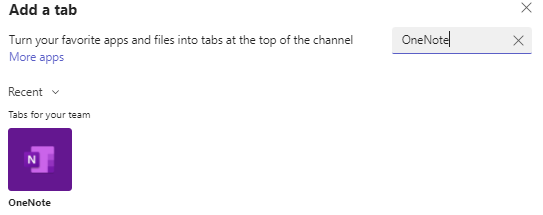
  1. Click on the + icon (Note: make sure you have clicked on your new channel)


  2. Type in the search box, OneNote


  3. Click on Add
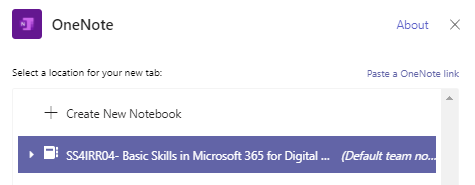
  4. Select your OneNote Notebook and click on Save


In the discussion forum below, describe any apps that you think will be useful to add to a team.

Log in to continue

Only logged in users can post to this forum.

Contact site support
You are currently using guest access (Log in)
Data retention summary
Get the mobile app
Powered by Moodle
This page is: General type: base. Context Forum: Activity: Adding Apps to Channel Tabs (context id 353240). Page type mod-forum-post.